
 Cartoon from your photosYour story, starring you
 Personal song giftAbout your person, with their name
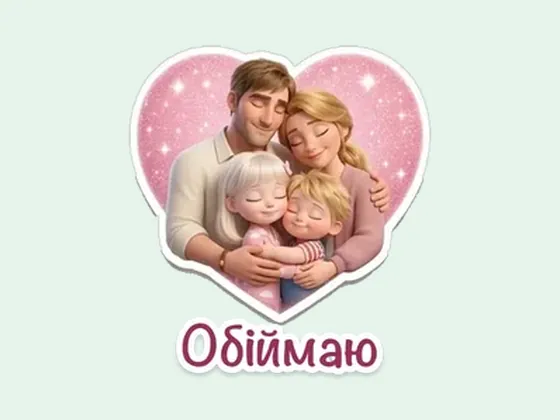 Telegram stickersYour family as a sticker pack
 Calendar 202712 scenes of the year starring you
 Vision board 2027A moodboard and video with you
You want a sticker of your own when a chat keeps missing one particular face: the cat who looks on in disapproval, the friend who is always late, Mom with her “Did you eat?”. A single sticker from a photo takes a few minutes right inside Telegram, and a whole set from ready-made pictures can be made through the official bot. Below are three ways with steps, the image requirements, how to share a set and who will see it afterward. And at the end, an honest look at when it's simpler not to make it yourself but to order a ready-made set.
The short answer
The fastest way is the built-in editor: in any chat, open the sticker panel, tap (+), pick a photo, remove the background with one tap, add text and either send the sticker or save it to a new set. If your pictures are already prepared, upload them through the official @Stickers bot: PNG or WEBP format, one side exactly 512 pixels, the other no more than 512. The third route is a sticker-maker app or a photo editor. The first two methods are available to all Telegram users; Premium is not needed for regular stickers.
But if you want not cut-out photos but drawn heroes, for example your whole family or a couple in one style and with captions in your own language, doing it yourself takes a long time. A set like that is simpler to order.
Way 1. The sticker editor inside Telegram
The editor appeared in Telegram in spring 2024 and works right in the chat, with no separate programs. It cuts a person or an object out of a photo, removes the background, and lets you add an outline, text, a drawing or an emoji. The path below is for the phone app, and it is the same on Android and iPhone. If you don't see some button, update Telegram first.
1. Open any chat. For trying things out, a chat with yourself is handy, so you don't send a draft to anyone.
2. Open the sticker panel with the icon next to the message field and tap the (+) button.
3. Pick a photo from your gallery. With one tap the editor will cut out the object and remove the background. If it caught something extra or cut off an ear, fix it by hand: you can erase the extra bits and restore what was cut off.
4. Add an outline to get the classic sticker look, and text: “On my way”, “Love you”, “Come ooon, Mom”.
5. Send the sticker right away or create a new set from it. For each sticker in a set, Telegram will ask you to pick an emoji: when you type that smiley, the sticker will appear in the suggestions.
Further stickers are added to the same set in the same way. You can also add other people's stickers that already exist in Telegram to your set, for example to collect all your favorites in one place.
Even shorter: a sticker from a photo already in a chat
Since March 2026 you can make a sticker from any photo you have opened full screen in a chat: Telegram turns it into a sticker with one tap. After that it's the same as in the editor: cut out the object, add text or an emoji, then send it, save it to favorites or add it to a set.
You can also rework an existing sticker or GIF the same way: press and hold it in the panel and choose edit. This comes in handy when the picture is great but a caption for your situation is missing.
Way 2. The @Stickers bot: a set from ready-made pictures
This way is for those who already have the pictures ready: hand-drawn and scanned, cut out in a graphics editor, made by a designer. Find the official @Stickers bot in Telegram search (it carries a verified checkmark) and start it. The bot has a mini app: in it you create and edit sets with buttons, and you can also see statistics, such as how many times your stickers were sent and added.
The same actions work with text commands. The /newpack command starts a new set of regular stickers. The bot will ask for a name, which everyone will see in the sticker panel. Then you send the picture as a file, not as a photo, and an emoji for it, and so on with each sticker.
When everything is uploaded, send /publish. The bot will offer to set an icon for the set; for regular stickers you can skip this step with the /skip command. The last thing is a short name for the set: it becomes a link like t.me/addstickers/name, which you can send to anyone.
A finished set can be added to and edited: /addsticker adds a new sticker, /replacesticker swaps an old one for an updated one, /ordersticker changes the order, /delsticker deletes. Changes can take up to an hour to reach all users, so don't worry if a friend still sees the old version.
It's more convenient to upload files from a computer: Telegram's own official instructions advise doing it through Telegram Desktop or the web version.
Image requirements so the bot accepts it
The format is PNG or WEBP. One side is exactly 512 pixels, the other is 512 or less. So a 512 by 512 square works, or, for example, 512 by 400. If the picture is larger, shrink it to the right size in any editor.
The background is transparent. Telegram also advises a white outline and a light black shadow: that way the sticker doesn't blend into the chat background in either the light or the dark theme.
The set icon, if you want your own, is 100 by 100 pixels, also PNG or WEBP. Without it, the first sticker becomes the icon.
In Telegram's developer documentation the limit for a regular set is 120 stickers. If you need more, make a second set.
Animated stickers are a separate story. A video sticker needs a WEBM file with the VP9 codec, no sound, up to 3 seconds long, up to 30 frames per second and no heavier than 256 KB. That is already a job for a video editor, not a five-minute one.
Way 3. A sticker-maker app or a photo editor
App stores have programs that cut a person out of a photo, add a frame and text, and pass the finished set straight to Telegram. Telegram has supported this kind of import since version 7.8. Keep one detail in mind: each import creates a separate new set, so adding stickers to an old set is more convenient through @Stickers.
Before installing such an app, look at what permissions it asks for and what its privacy policy says about photos. You are handing it the faces of your relatives. Some of these programs show ads or ask for a subscription for the full version, which is usually visible already on the store page.
If you know your way around a photo editor, you can do everything by hand: cut out the figure, place it on a transparent background, add a white outline and a caption, save a 512 by 512 PNG and upload it through @Stickers. It takes longer, but you choose the font and colors yourself and keep one style across the whole set.
How to share a set and who will see it
For a friend to get the whole set, it's enough to send them one sticker: they tap it and add the set to their own. Every set also has a permanent link, t.me/addstickers/..., which you can pin in the family chat.
The flip side: a set isn't tied to your chat. Anyone who gets even one sticker can add the entire set and forward it on. If the stickers show children, decide in advance whether you're comfortable with their faces traveling through other people's chats, and don't send such a set outside the family.
Which way to choose
It all depends on how many stickers you need and whether it matters that they are in one style.
1Telegram's built-in editor
When you need it quickly and from what's already in your gallery: a funny photo of the cat, a friend's face from a party, a joke for one evening. A few minutes and the sticker is in the chat. The downside: these are cut-out photos, so stickers from different shots look different.
2The @Stickers bot
When the pictures are ready and you want a full set: with a name, an icon, sticker order, replacements and statistics. The bot itself draws nothing, it only collects and publishes what you send it.
3An app or a photo editor
When you want frames, fonts and an identical look for all the stickers, and you have a free evening. Check what the app does with your photos before uploading your relatives' faces there.
4A ready-made set with drawn heroes
When you need not cut-out photos but your family or couple as cartoon 3D heroes, identical across all the stickers, with captions in your own language. Milodia makes sets like this from your photos. See examples of sets
When it's simpler to order a ready-made set
If you need one funny sticker with a cat, make it yourself: the built-in editor will do it better and faster than anyone. An order makes sense when the idea is more complex than a cut-out photo.
For example, you want a set for the whole family: Mom, Dad, the kids, Grandma and the dog, all drawn in one style, with emotions for every day and captions your family really says. Or stickers for two: “Miss you”, “Where are you?”, “Hugging you”, with your faces, as an anniversary gift or just for no reason. Getting one person to be recognizable across twenty different pictures yourself takes a long time even with a good editor.
At Milodia, such sets are made from a few ordinary photos from your phone. First you're shown the heroes for approval, captions can be replaced with your own, and the finished set arrives as a link in Telegram and is added with one button. It's handy as a gift: the person opens the link, and stickers with your family appear in the family chat.
Frequently asked questions
How do I make a sticker from a photo in Telegram without third-party apps?
Open any chat, open the sticker panel with the icon next to the message field and tap (+). Pick a photo, remove the background with one tap, and add an outline and text if you like. Then send the sticker right away or save it to a new set, picking an emoji for it.
What size should an image for a sticker be?
For the @Stickers bot: PNG or WEBP, one side exactly 512 pixels, the other 512 or less. The background should preferably be transparent, and a white outline helps the sticker not get lost in the chat.
How many stickers can one set have?
In Telegram's documentation the limit for a regular set is 120 stickers. If you need more, create another set.
How do I change or delete a sticker in a set that already exists?
Through the @Stickers bot: in its mini app, or with the commands /replacesticker (replace), /ordersticker (change the order) and /delsticker (delete). An update can take up to an hour to reach other users.
Can strangers see my stickers?
Yes, if even one sticker reaches them: by tapping it, a person can add the whole set to their own, and the set also opens by the link t.me/addstickers/... So it's better not to send stickers with children outside the family.