
 Cartoon from your photosYour story, starring you
 Personal song giftAbout your person, with their name
 Telegram stickersYour family as a sticker pack
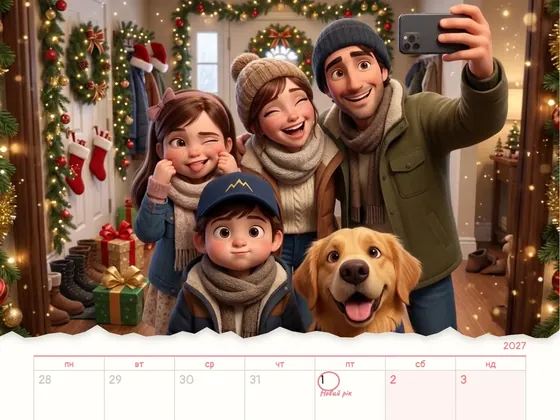 Calendar 202712 scenes of the year starring you
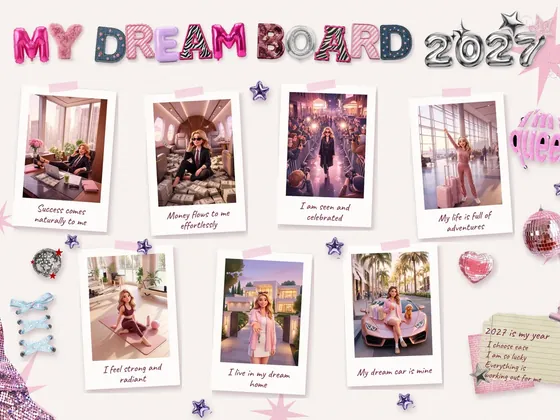 Vision board 2027A moodboard and video with you
A photo calendar is one of the few gifts that never ends up in a drawer: it hangs in the kitchen or above a desk and turns to a new page every month. There are three ways to make one for 2027. You can use the online builder of a photo printing service, design it yourself from a template and print it at home or at a copy shop, or order an illustrated calendar where your family appears as cartoon characters in twelve scenes of the year. Below is each option step by step, practical printing tips (paper, margins, binding), and what to keep in mind if the calendar is a gift for family in another city or country.
The short answer
The easiest way to make a custom photo calendar is the online builder of a photo printing service: pick a format, upload 12 photos plus one for the cover, check every month and get a printed, bound calendar back. If you want your own design, take a 2027 calendar template in Canva, Word or a calendar app, add your photos, save it as a PDF, print it on heavy matte paper at home or at a copy shop, and coil-bind it at the top. The third route is a custom illustrated calendar: an artist or studio draws your family as the characters of each month's scene, and you get a print-ready file.
If it's a holiday gift, the main difference is time. Print shops are at their busiest at the end of the year, and a DIY calendar takes a few evenings of choosing photos and laying out pages.
DIY or order: an honest comparison
A DIY calendar isn't a one-click job. You need to pick 13 good photos out of hundreds on your phone, find a template with the correct 2027 grid, add birthdays and holidays, save a PDF and print a test page. That usually takes a few hours, often a couple of evenings. What you end up with is a regular photo calendar: your snapshots above each month's grid.
With a Milodia order, your part is different: send 1 to 10 photos where faces are clearly visible, write down names, dates and wishes, then approve how you've been drawn. You get finished files: a 13-page PDF to print and phone wallpapers. There's no grid to lay out and no photo to choose for every month, and your dates are marked on the right pages. You still print the file yourself, at home or at a copy shop.
The bigger difference is the result, not the time. In an ordered calendar, every page shows you or your whole family drawn as cartoon characters: at the holiday table, at the beach, on the first day of school, with your pet. The characters are drawn from your photos and shown to you for approval first, so you can make sure you recognize yourselves. That's hard to make on your own even with a good template: it takes illustration, not a layout editor.
When DIY is the better choice: you want your favorite photos of the year on the wall, you enjoy laying out pages, or you need a calendar that arrives already printed and bound, with no trip to a copy shop. Then a template or a print shop builder will serve you better. If you'd rather see yourselves in the scenes than in snapshots, and don't want to spend your evenings on it, ordering is simpler.
First decide what kind of calendar, and who it's for
A wall calendar that flips is the classic: a cover and 12 pages, each with a photo on top and the month's grid below. It goes where everyone walks past every day, like the kitchen, the hallway or the fridge. A desk calendar is smaller and stands on a desk, but the photos are tiny. A one-page poster calendar shows the whole year at once, so it's more about dates than memories.
Think about the person who will use it, too. Grandparents need big numbers and room to write in appointments more than a trendy grid in a small font. For a wife or a close friend, a calendar can carry a mood, with each month as a memory or a wish for the year. Families with kids love it when birthdays, the first day of school and the vacation are already marked.
Option 1. An online builder from a photo printing service
Most photo printing services, many pharmacy photo centers and office supply stores have an online calendar builder. You choose the type (wall, desk, poster) and a template, upload your photos, and the builder places them month by month. Then you can swap photos around, add captions and your own dates, pay, and have the calendar shipped or pick it up in store.
Pros: printing, trimming and binding are done for you, and the paper and coil are factory quality. Cons: templates tend to look alike, and in December print and shipping queues get longer, so order early.
Before you pay, preview every month on its own. Many builders flag photos with too low a resolution, and that warning is worth taking seriously: a blurry photo is far more obvious on the wall than on a phone screen. Keep faces and captions away from the page edges, where trimming or the binding holes can clip them.
Option 2. DIY: a template, a PDF and a copy shop
Pick 12 photos plus one for the cover, using the originals from your phone: copies sent through messaging apps are compressed and too weak for print. Take a 2027 template from Canva, Word or Google Docs and check two things: January 1, 2027 falls on a Friday, and the week starts on the day the recipient is used to (Sunday on most US calendars, Monday in Ukraine and most of Europe). Take public holidays from the official 2027 list of the country where the calendar will hang.
Export a PDF at the highest quality and print one test page first: colors on paper usually come out darker than on screen. The upside of DIY is total design freedom; the downside is time, especially the first time.
How to print a calendar that looks store-bought
Paper. Regular 20 lb copy paper (about 75 gsm) is too thin for a calendar: it shows through, ripples under ink, and the corners curl within a few months. Use a heavy matte paper or light cardstock, around 60-65 lb cover (roughly 160-175 gsm). Matte paper doesn't glare under a lamp, and it's easy to write on. Before buying 80 lb cover (about 216 gsm) or heavier, check the maximum paper weight in your printer's specs, because not every home printer can feed it. At a copy shop, just say you're printing a calendar and ask for heavy matte stock.
Resolution. For a sharp print, a photo needs roughly 300 dpi at its printed size. For a full US Letter page, that's about 2550 by 3300 pixels. An original from a modern phone handles that easily; a copy that went through a messaging app often doesn't.
Margins. Keep photos and numbers away from the edges, and leave a clear strip at the top of each page for the binding holes.
Binding. A wire coil at the top with a hanger looks the most polished: pages flip all the way back and lie flat against the wall. Most print and copy shops offer coil binding. Without one, use binder rings, a large binder clip, a clipboard, or a string with clothespins to hang the pages one by one. Or simply keep the current month on the fridge under a magnet.
Option 3. A calendar where your family are the cartoon characters
Sometimes the family photos have already been in every calendar, and you want something different: you yourselves, drawn as the characters of each month's scene. A New Year's dinner, a spring walk, summer at the sea, the first day of school, the pet right there with you.
That's how calendars from Milodia work. You send 1 to 10 ordinary phone photos where faces are clearly visible, along with names, important dates and wishes. First you're shown how you've been drawn, and you can ask to change a hairstyle, glasses or eye color. The scenes are chosen for your family: holidays, hobbies, travel, your pet, and you can request a specific scene.
The finished files arrive in Telegram: a 13-page A4 PDF (cover plus 12 months) and a phone wallpaper for every month with a small calendar on it. The studio doesn't print or mail calendars. You print the file at home or at any copy shop, and the tips above apply just the same. For family in the US or Canada, there's an English version in US Letter size. See the current prices on the order page.
12027 Wish Calendar
For her: a wife, mom, sister or friend. Twelve months, twelve of her wishes, and on every page she is already living one of them. 13 printable pages, 12 phone wallpapers plus a gift lock screen, and on the 1st of each month her phone reminds her of that month's wish. See the pages and current prices
22027 Family Calendar
The whole family and the pet in 12 scenes of the year: holidays, vacation, the first day of school. Your birthdays and anniversaries are marked on the right pages. 13 printable pages and 13 phone wallpapers. See examples and current prices
Which dates and captions to add
Dates are what turn a calendar into a gift. Mark the birthdays of everyone on the pages, your parents' wedding anniversary, the day the cat came home, your first trip together. Under each month's picture you can add where and when it was taken, or a line everyone in the family will recognize.
Don't overload the page: two or three notes a month read better than ten. And leave room in the boxes for handwriting, especially if the calendar will hang in a grandparent's kitchen.
Giving a calendar to family far away
A printed calendar in a holiday parcel is a gamble: December mail is overloaded, and the gift may arrive after the holidays. A file doesn't have that problem. Send the PDF to a relative who lives near the recipient, and they can print it at a local copy shop. Or print it yourself where you live and hand it over when you visit.
Mind the paper size. The US and Canada use US Letter, while Ukraine and most of Europe use A4. A file made for one size has to be scaled to print on the other, and the margins shift, so it's better to make the version for the country where the calendar will hang.
Which option to choose
A print shop builder, when you want a finished printed calendar with your photos and no layout work. DIY, when your own design matters and you have a few free evenings. An illustrated calendar, when you want the pages to show you yourselves in scenes of the year rather than snapshots, and printing a file at a copy shop doesn't put you off.
Whichever you pick, don't leave it to the last week of December: print shops and copy centers are busiest right before the holidays, and approving photos or characters takes time too.
Frequently asked questions
How do I make a photo calendar at home?
Take a 2027 calendar template in Canva, Word or a calendar app, add 12 photos and a cover, mark your dates and export a PDF. Check that January 1, 2027 falls on a Friday and that the week starts on the day the recipient is used to. Print on heavy matte paper and coil-bind it at the top.
What paper is best for printing a calendar?
A heavy matte paper or light cardstock, around 60-65 lb cover (roughly 160-175 gsm): it doesn't show through or ripple, and it's easy to write on. Regular 20 lb copy paper is too thin. Before buying 80 lb cover or heavier, check the maximum paper weight your printer can handle.
How can I bind a calendar without a binding machine?
Most print and copy shops offer coil binding. At home, binder rings, a large binder clip, a clipboard or a string with clothespins all work.
How many photos do I need for a photo calendar?
For a photo calendar, 12 for the months and one for the cover, ideally originals from your phone rather than copies from a messaging app. For an illustrated calendar from Milodia, 1 to 10 photos with clearly visible faces are enough: the characters are drawn, so you don't need a separate photo for each month.
Does Milodia print and ship the calendar?
No. The finished files arrive in Telegram: a 13-page A4 PDF and phone wallpapers. You print the calendar at home or at any copy shop, and for family in the US or Canada there's an English version in US Letter size.
How do I give a calendar to family in another country?
Send a file instead of a parcel: share the PDF in a messaging app and have it printed at a copy shop near the recipient, so the gift doesn't get stuck in holiday mail. Make it in the paper size used there: US Letter in the US and Canada, A4 in Ukraine and most of Europe.
What dates should go on a family calendar?
Birthdays of everyone on the pages, anniversaries, the first day of school, planned vacations and holidays. Take public holidays from the official 2027 list of the country where the calendar will hang. Two or three notes a month read better than ten.